> ## Documentation Index
> Fetch the complete documentation index at: https://docs-staging-feat-docs-5612-expanded-grant-support-ea.mintlify.site/llms.txt
> Use this file to discover all available pages before exploring further.

> Learn how to configure a progressive profile form using Forms for Actions

# Use Cases: Configure a progressive profile form using Forms

<Card title="Before you start">
  1. Create a [Machine-to-Machine Application](/docs/get-started/auth0-overview/create-applications/machine-to-machine-apps) with the following scopes enabled:

  * `read:users`
  * `update:users`
  * `create:users`
  * `read:users_app_metadata`
  * `update:users_app_metadata`
  * `create:users_app_metadata`

  2. Add a [Vault connection](/docs/customize/forms/vault) using the M2M application credentials.
</Card>

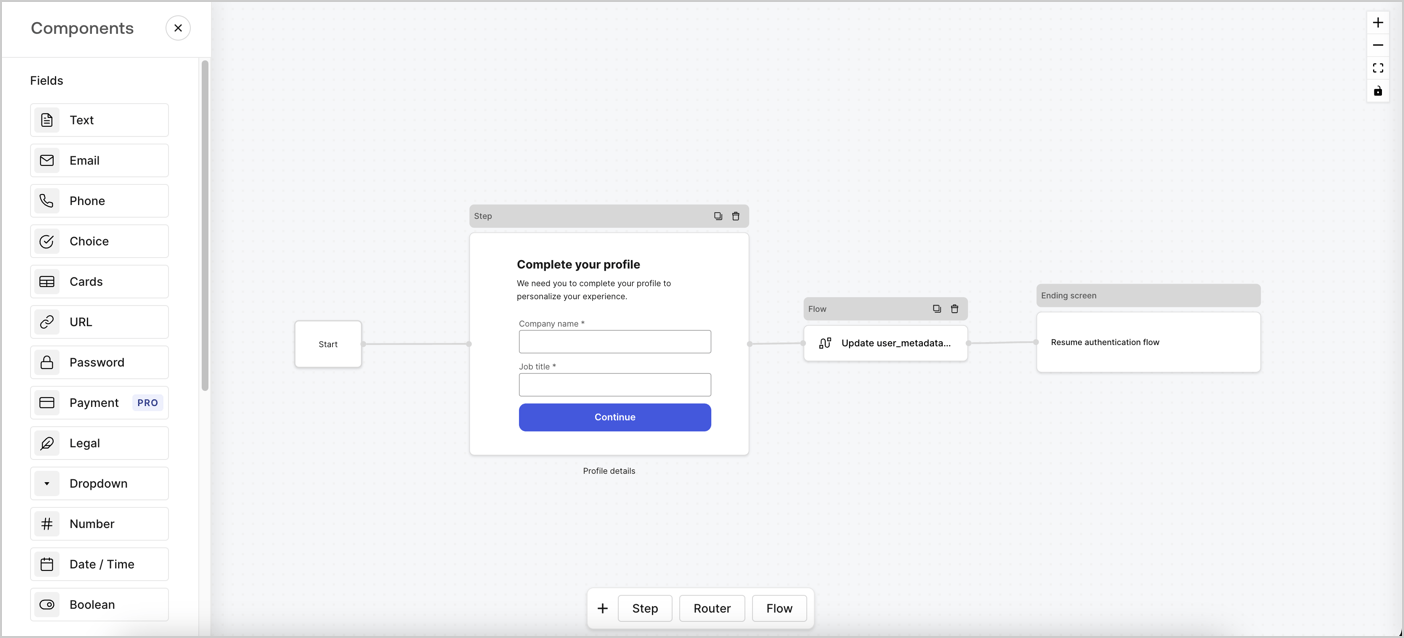
Forms for Actions allows you to create progressive profiling flows to decide when to prompt users to collect missing information, such as company name and job title, and store them as `user_metadata` attributes.
<Frame>
  <img src="https://mintcdn.com/docs-staging-feat-docs-5612-expanded-grant-support-ea/96dAG6L4N0cU8PsO/docs/images/cdy7uua7fh8z/xUx9YmnHvnAqL19JvNtNP/60dae88f893d4ebe8e3523421e960596/Progressive-profle-overview.png?fit=max&auto=format&n=96dAG6L4N0cU8PsO&q=85&s=2f174cf14d3ff835f3ac6d4ba258331f" alt="Dashboard > Actions > Forms > Form" data-og-width="1404" width="1404" data-og-height="638" height="638" data-path="docs/images/cdy7uua7fh8z/xUx9YmnHvnAqL19JvNtNP/60dae88f893d4ebe8e3523421e960596/Progressive-profle-overview.png" data-optimize="true" data-opv="3" srcset="https://mintcdn.com/docs-staging-feat-docs-5612-expanded-grant-support-ea/96dAG6L4N0cU8PsO/docs/images/cdy7uua7fh8z/xUx9YmnHvnAqL19JvNtNP/60dae88f893d4ebe8e3523421e960596/Progressive-profle-overview.png?w=280&fit=max&auto=format&n=96dAG6L4N0cU8PsO&q=85&s=693b9fdf575aa85af2169e1c73cd0795 280w, https://mintcdn.com/docs-staging-feat-docs-5612-expanded-grant-support-ea/96dAG6L4N0cU8PsO/docs/images/cdy7uua7fh8z/xUx9YmnHvnAqL19JvNtNP/60dae88f893d4ebe8e3523421e960596/Progressive-profle-overview.png?w=560&fit=max&auto=format&n=96dAG6L4N0cU8PsO&q=85&s=a45d37d926d372806336ab0d0bc99744 560w, https://mintcdn.com/docs-staging-feat-docs-5612-expanded-grant-support-ea/96dAG6L4N0cU8PsO/docs/images/cdy7uua7fh8z/xUx9YmnHvnAqL19JvNtNP/60dae88f893d4ebe8e3523421e960596/Progressive-profle-overview.png?w=840&fit=max&auto=format&n=96dAG6L4N0cU8PsO&q=85&s=7a8ccbabde5f6666ec4855ce7b6a2711 840w, https://mintcdn.com/docs-staging-feat-docs-5612-expanded-grant-support-ea/96dAG6L4N0cU8PsO/docs/images/cdy7uua7fh8z/xUx9YmnHvnAqL19JvNtNP/60dae88f893d4ebe8e3523421e960596/Progressive-profle-overview.png?w=1100&fit=max&auto=format&n=96dAG6L4N0cU8PsO&q=85&s=40cbd9d1b56063f23d05c2a816527b70 1100w, https://mintcdn.com/docs-staging-feat-docs-5612-expanded-grant-support-ea/96dAG6L4N0cU8PsO/docs/images/cdy7uua7fh8z/xUx9YmnHvnAqL19JvNtNP/60dae88f893d4ebe8e3523421e960596/Progressive-profle-overview.png?w=1650&fit=max&auto=format&n=96dAG6L4N0cU8PsO&q=85&s=237c48a2e144ba1939e30a964f512ce5 1650w, https://mintcdn.com/docs-staging-feat-docs-5612-expanded-grant-support-ea/96dAG6L4N0cU8PsO/docs/images/cdy7uua7fh8z/xUx9YmnHvnAqL19JvNtNP/60dae88f893d4ebe8e3523421e960596/Progressive-profle-overview.png?w=2500&fit=max&auto=format&n=96dAG6L4N0cU8PsO&q=85&s=eaac21ce3b8499f913c84d2af867d536 2500w" />
</Frame>

The sections below outline how you can create a progressive profile form using nodes and flows, along with steps for adding your form to a [Post Login Action](/docs/customize/actions/explore-triggers/signup-and-login-triggers/login-trigger).

## Create a form from scratch

Follow these steps to create a form to gather information:

1. Open the Form editor by selecting **Auth0 Dashboard > Actions > Forms.**
2. Select **Create Form** > **Start from scratch**.

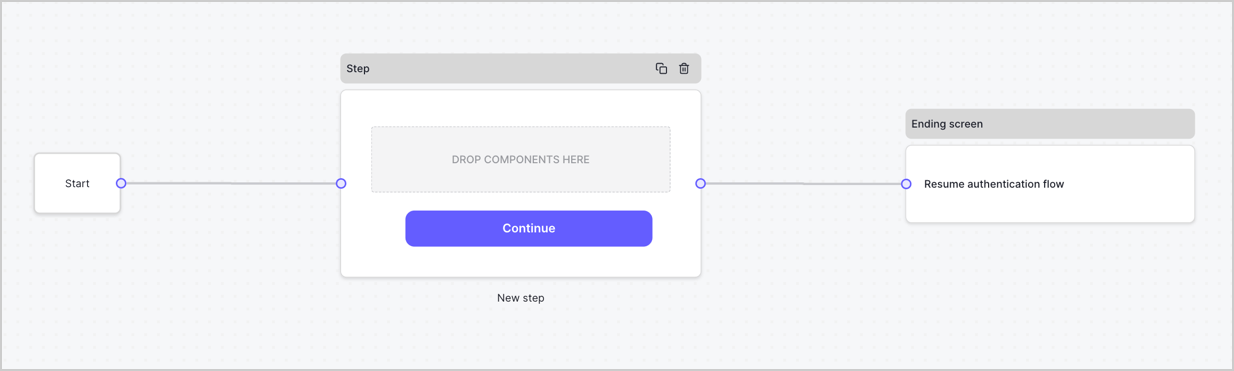
By default, a new form contains a Start node, a Step node, and an Ending screen node.
<Frame>
  <img src="https://mintcdn.com/docs-staging-feat-docs-5612-expanded-grant-support-ea/fOyWaRq4jbbrpajC/docs/images/cdy7uua7fh8z/2TZ9jSjgEcARFpULI6hz4R/a4319a1bd482f2ee5cc23100fdb2f42c/New-form-Forms-for-action-use-case.png?fit=max&auto=format&n=fOyWaRq4jbbrpajC&q=85&s=455cfcabcf8586e80d076488bef06d59" alt="Dashboard > Forms > Use Cases > Form" data-og-width="1234" width="1234" data-og-height="371" height="371" data-path="docs/images/cdy7uua7fh8z/2TZ9jSjgEcARFpULI6hz4R/a4319a1bd482f2ee5cc23100fdb2f42c/New-form-Forms-for-action-use-case.png" data-optimize="true" data-opv="3" srcset="https://mintcdn.com/docs-staging-feat-docs-5612-expanded-grant-support-ea/fOyWaRq4jbbrpajC/docs/images/cdy7uua7fh8z/2TZ9jSjgEcARFpULI6hz4R/a4319a1bd482f2ee5cc23100fdb2f42c/New-form-Forms-for-action-use-case.png?w=280&fit=max&auto=format&n=fOyWaRq4jbbrpajC&q=85&s=da94aabe8d3a9503fc698705e6e31c48 280w, https://mintcdn.com/docs-staging-feat-docs-5612-expanded-grant-support-ea/fOyWaRq4jbbrpajC/docs/images/cdy7uua7fh8z/2TZ9jSjgEcARFpULI6hz4R/a4319a1bd482f2ee5cc23100fdb2f42c/New-form-Forms-for-action-use-case.png?w=560&fit=max&auto=format&n=fOyWaRq4jbbrpajC&q=85&s=fb8fe89290353923a1a4bf8995f1c586 560w, https://mintcdn.com/docs-staging-feat-docs-5612-expanded-grant-support-ea/fOyWaRq4jbbrpajC/docs/images/cdy7uua7fh8z/2TZ9jSjgEcARFpULI6hz4R/a4319a1bd482f2ee5cc23100fdb2f42c/New-form-Forms-for-action-use-case.png?w=840&fit=max&auto=format&n=fOyWaRq4jbbrpajC&q=85&s=da65393e2d99557168c0ab3b692c4316 840w, https://mintcdn.com/docs-staging-feat-docs-5612-expanded-grant-support-ea/fOyWaRq4jbbrpajC/docs/images/cdy7uua7fh8z/2TZ9jSjgEcARFpULI6hz4R/a4319a1bd482f2ee5cc23100fdb2f42c/New-form-Forms-for-action-use-case.png?w=1100&fit=max&auto=format&n=fOyWaRq4jbbrpajC&q=85&s=92464843c6420ffb2f769cd4a711a4f7 1100w, https://mintcdn.com/docs-staging-feat-docs-5612-expanded-grant-support-ea/fOyWaRq4jbbrpajC/docs/images/cdy7uua7fh8z/2TZ9jSjgEcARFpULI6hz4R/a4319a1bd482f2ee5cc23100fdb2f42c/New-form-Forms-for-action-use-case.png?w=1650&fit=max&auto=format&n=fOyWaRq4jbbrpajC&q=85&s=ca04cd6502a9707c40929eb587ab8d42 1650w, https://mintcdn.com/docs-staging-feat-docs-5612-expanded-grant-support-ea/fOyWaRq4jbbrpajC/docs/images/cdy7uua7fh8z/2TZ9jSjgEcARFpULI6hz4R/a4319a1bd482f2ee5cc23100fdb2f42c/New-form-Forms-for-action-use-case.png?w=2500&fit=max&auto=format&n=fOyWaRq4jbbrpajC&q=85&s=f1e850d226822e8bf21444a79110f4e8 2500w" />
</Frame>

### Configure the Step node

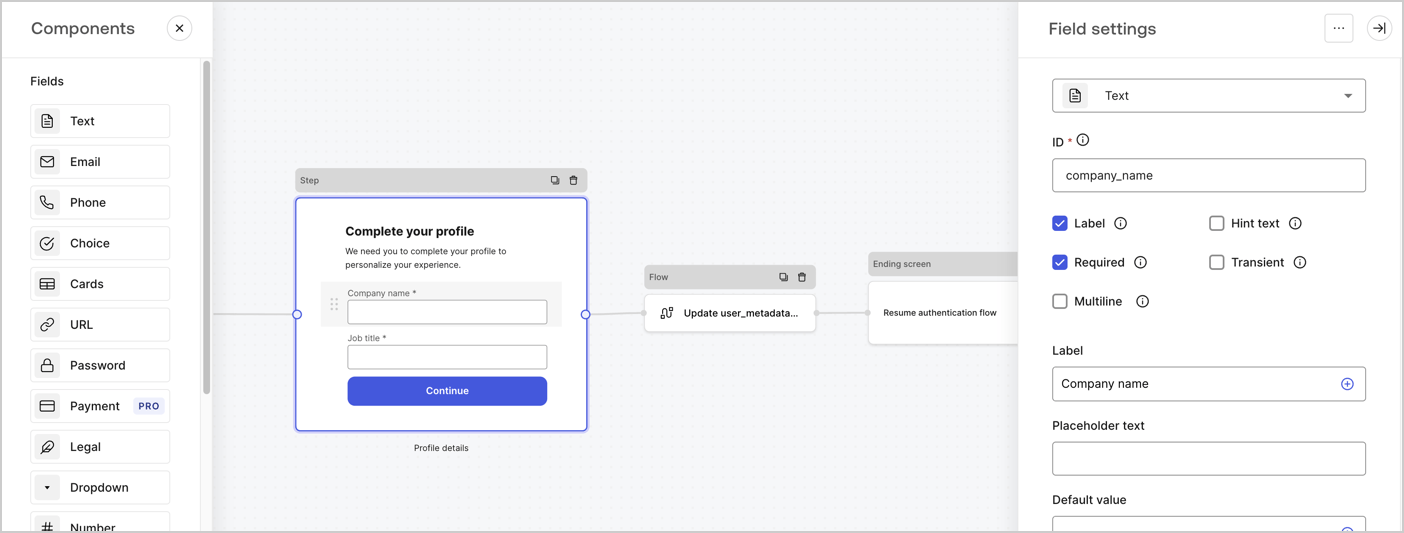
The Step node is the graphical interface visible to users. Add [Fields](/docs/customize/forms/nodes-and-components) to the Step node to collect the user's company name and job title values by following these steps:

1. Drag a **Rich text** field from the **Components menu** into the **Step** node.

   * **Rich text**: Enter a custom message.

     * **Example**: `Complete your profile! We need you to complete your profile to personalize your experience.`
   * Select **Save**.
2. Drag a **Text** field into the **Step** node.

   * **ID**: Enter `company_name`.
   * **Label**: Enable the checkbox.
   * **Label**: Enter `Company name`.
   * **Required**: Enable the checkbox.
   * Select **Save**.
3. Drag a **Text** field into the **Step** node.

   1. **ID**: Enter `job_title`.
   2. **Label**: Enter `Job title`.
   3. **Label**: Enable the checkbox.
   4. **Required**: Enable the checkbox.
   5. Select **Save**.
4. Select **Publish** to save.
<Frame>
  <img src="https://mintcdn.com/docs-staging-feat-docs-5612-expanded-grant-support-ea/9hfF-AyYi6DR5vLX/docs/images/cdy7uua7fh8z/6H1lRzwKyYioQyQJ9MtIoM/aa248e92fc028a68a5b92ff361a11644/progressive-profile-step.png?fit=max&auto=format&n=9hfF-AyYi6DR5vLX&q=85&s=0d3f0afceaba9a0eaa478014e0a509cb" alt="Dashboard > Actions > Forms > Form > Step node" data-og-width="1404" width="1404" data-og-height="533" height="533" data-path="docs/images/cdy7uua7fh8z/6H1lRzwKyYioQyQJ9MtIoM/aa248e92fc028a68a5b92ff361a11644/progressive-profile-step.png" data-optimize="true" data-opv="3" srcset="https://mintcdn.com/docs-staging-feat-docs-5612-expanded-grant-support-ea/9hfF-AyYi6DR5vLX/docs/images/cdy7uua7fh8z/6H1lRzwKyYioQyQJ9MtIoM/aa248e92fc028a68a5b92ff361a11644/progressive-profile-step.png?w=280&fit=max&auto=format&n=9hfF-AyYi6DR5vLX&q=85&s=5b144818a351c8226a3a130a8df91023 280w, https://mintcdn.com/docs-staging-feat-docs-5612-expanded-grant-support-ea/9hfF-AyYi6DR5vLX/docs/images/cdy7uua7fh8z/6H1lRzwKyYioQyQJ9MtIoM/aa248e92fc028a68a5b92ff361a11644/progressive-profile-step.png?w=560&fit=max&auto=format&n=9hfF-AyYi6DR5vLX&q=85&s=09104535aae9369e5d6883ad3e798a21 560w, https://mintcdn.com/docs-staging-feat-docs-5612-expanded-grant-support-ea/9hfF-AyYi6DR5vLX/docs/images/cdy7uua7fh8z/6H1lRzwKyYioQyQJ9MtIoM/aa248e92fc028a68a5b92ff361a11644/progressive-profile-step.png?w=840&fit=max&auto=format&n=9hfF-AyYi6DR5vLX&q=85&s=736787a67cbe2c66a29f6746578cea38 840w, https://mintcdn.com/docs-staging-feat-docs-5612-expanded-grant-support-ea/9hfF-AyYi6DR5vLX/docs/images/cdy7uua7fh8z/6H1lRzwKyYioQyQJ9MtIoM/aa248e92fc028a68a5b92ff361a11644/progressive-profile-step.png?w=1100&fit=max&auto=format&n=9hfF-AyYi6DR5vLX&q=85&s=09ee51f4ce04abeff2ced3f863bab429 1100w, https://mintcdn.com/docs-staging-feat-docs-5612-expanded-grant-support-ea/9hfF-AyYi6DR5vLX/docs/images/cdy7uua7fh8z/6H1lRzwKyYioQyQJ9MtIoM/aa248e92fc028a68a5b92ff361a11644/progressive-profile-step.png?w=1650&fit=max&auto=format&n=9hfF-AyYi6DR5vLX&q=85&s=77e83a1245a3af193d7c2526263fddbe 1650w, https://mintcdn.com/docs-staging-feat-docs-5612-expanded-grant-support-ea/9hfF-AyYi6DR5vLX/docs/images/cdy7uua7fh8z/6H1lRzwKyYioQyQJ9MtIoM/aa248e92fc028a68a5b92ff361a11644/progressive-profile-step.png?w=2500&fit=max&auto=format&n=9hfF-AyYi6DR5vLX&q=85&s=0d71d3287b16f7f8155e2a0f700bdb96 2500w" />
</Frame>

### Configure the flow node

Add a **Flow** node after the **Step** node to update the `user_metadata` and resume the authentication flow by following these steps:

1. Select **Flow** from the bottom of the Form editor.
2. Remove the existing link between the **Step** and **Ending Screen** nodes.
3. Select the new **Flow** > **Click to add a flow** > **Create a new flow.**

   * Enter `Update user_metadata` in the **Name** field.
   * Select **Create**.
   * Select **Save**.
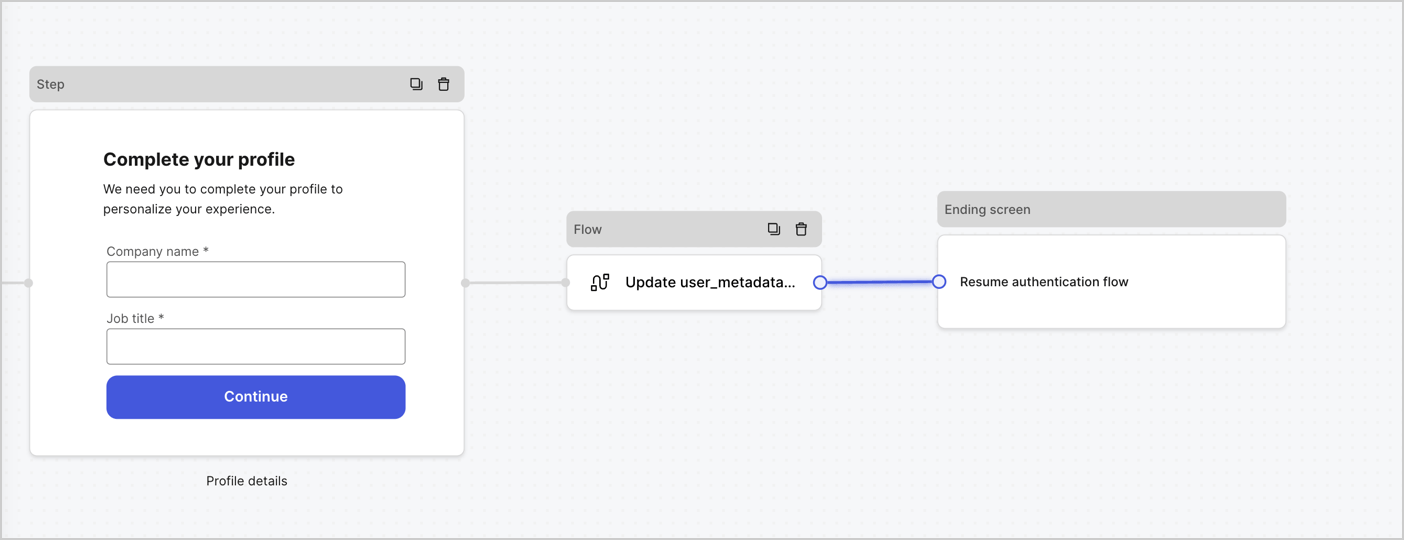
4. Link the **Flow** node to the **Step** and **Ending Screen** nodes as pictured below.
5. Select **Publish** to save.
<Frame>
  <img src="https://mintcdn.com/docs-staging-feat-docs-5612-expanded-grant-support-ea/LIbMoziEn8oPV0Vi/docs/images/cdy7uua7fh8z/5C91DaWn4LGtJT9BF87ssu/095171d0c452a287c44bfde12fd6d13f/link-nodes.png?fit=max&auto=format&n=LIbMoziEn8oPV0Vi&q=85&s=54bebae001ae546030c59b6c24ed6766" alt="Dashboard > Actions > Forms > Form" data-og-width="1404" width="1404" data-og-height="540" height="540" data-path="docs/images/cdy7uua7fh8z/5C91DaWn4LGtJT9BF87ssu/095171d0c452a287c44bfde12fd6d13f/link-nodes.png" data-optimize="true" data-opv="3" srcset="https://mintcdn.com/docs-staging-feat-docs-5612-expanded-grant-support-ea/LIbMoziEn8oPV0Vi/docs/images/cdy7uua7fh8z/5C91DaWn4LGtJT9BF87ssu/095171d0c452a287c44bfde12fd6d13f/link-nodes.png?w=280&fit=max&auto=format&n=LIbMoziEn8oPV0Vi&q=85&s=46bb34442236bd10ac1ee7455c0a28dc 280w, https://mintcdn.com/docs-staging-feat-docs-5612-expanded-grant-support-ea/LIbMoziEn8oPV0Vi/docs/images/cdy7uua7fh8z/5C91DaWn4LGtJT9BF87ssu/095171d0c452a287c44bfde12fd6d13f/link-nodes.png?w=560&fit=max&auto=format&n=LIbMoziEn8oPV0Vi&q=85&s=b80a1cf2dbec212ecbacb17471ded0b8 560w, https://mintcdn.com/docs-staging-feat-docs-5612-expanded-grant-support-ea/LIbMoziEn8oPV0Vi/docs/images/cdy7uua7fh8z/5C91DaWn4LGtJT9BF87ssu/095171d0c452a287c44bfde12fd6d13f/link-nodes.png?w=840&fit=max&auto=format&n=LIbMoziEn8oPV0Vi&q=85&s=7b5566e532b0773830cff5c229fd63d4 840w, https://mintcdn.com/docs-staging-feat-docs-5612-expanded-grant-support-ea/LIbMoziEn8oPV0Vi/docs/images/cdy7uua7fh8z/5C91DaWn4LGtJT9BF87ssu/095171d0c452a287c44bfde12fd6d13f/link-nodes.png?w=1100&fit=max&auto=format&n=LIbMoziEn8oPV0Vi&q=85&s=5b9fb7780c777cc0f8367052bf6eb212 1100w, https://mintcdn.com/docs-staging-feat-docs-5612-expanded-grant-support-ea/LIbMoziEn8oPV0Vi/docs/images/cdy7uua7fh8z/5C91DaWn4LGtJT9BF87ssu/095171d0c452a287c44bfde12fd6d13f/link-nodes.png?w=1650&fit=max&auto=format&n=LIbMoziEn8oPV0Vi&q=85&s=9f532956ad1734a1ec34e3aa131d2855 1650w, https://mintcdn.com/docs-staging-feat-docs-5612-expanded-grant-support-ea/LIbMoziEn8oPV0Vi/docs/images/cdy7uua7fh8z/5C91DaWn4LGtJT9BF87ssu/095171d0c452a287c44bfde12fd6d13f/link-nodes.png?w=2500&fit=max&auto=format&n=LIbMoziEn8oPV0Vi&q=85&s=d63260a04dc866586cc7ee97a711e229 2500w" />
</Frame>

Add an Auth0 Update user action to the flow by following these steps:

1. Select the **Update user\_metadata** flow, then select the **Edit Flow** to open the Flow editor in a new tab.
2. Below the **Start** action, select the **+** icon to add an **Update user** action. Complete the fields below, then select **Save** to continue.

   * **Connection**: Select from the dropdown the Vault connection to your M2M application.

   * **User ID**: Enter `{{context.user.user_id}}`.

   * **Body**: Copy and paste the following code to update the user\_metadata with `job_title` and `company_name` properties.

     ```json lines theme={null}
     {
        "user_metadata": {
           "job_title": "{{fields.job_title}}",
           "company_name": "{{fields.company_name}}"
        }
     }
     ```

   * Select **Save**.
3. Select **Publish** to save.

<Frame>
  <img src="https://mintcdn.com/docs-staging-feat-docs-5612-expanded-grant-support-ea/kQnqKUYmOilrXlXE/docs/images/cdy7uua7fh8z/65Jx4W5oIZJyyvA8z4HqIx/0661b1a8ca6361c54fc4fef07ba59f0b/update-user.png?fit=max&auto=format&n=kQnqKUYmOilrXlXE&q=85&s=10fdcc4488783464dcec354580df3b1b" alt="Dashboard > Actions > Forms > Flows" data-og-width="1404" width="1404" data-og-height="244" height="244" data-path="docs/images/cdy7uua7fh8z/65Jx4W5oIZJyyvA8z4HqIx/0661b1a8ca6361c54fc4fef07ba59f0b/update-user.png" data-optimize="true" data-opv="3" srcset="https://mintcdn.com/docs-staging-feat-docs-5612-expanded-grant-support-ea/kQnqKUYmOilrXlXE/docs/images/cdy7uua7fh8z/65Jx4W5oIZJyyvA8z4HqIx/0661b1a8ca6361c54fc4fef07ba59f0b/update-user.png?w=280&fit=max&auto=format&n=kQnqKUYmOilrXlXE&q=85&s=51331d9223411e6856f051c1a7413736 280w, https://mintcdn.com/docs-staging-feat-docs-5612-expanded-grant-support-ea/kQnqKUYmOilrXlXE/docs/images/cdy7uua7fh8z/65Jx4W5oIZJyyvA8z4HqIx/0661b1a8ca6361c54fc4fef07ba59f0b/update-user.png?w=560&fit=max&auto=format&n=kQnqKUYmOilrXlXE&q=85&s=53f8599bb517a24965653d09fe967d7e 560w, https://mintcdn.com/docs-staging-feat-docs-5612-expanded-grant-support-ea/kQnqKUYmOilrXlXE/docs/images/cdy7uua7fh8z/65Jx4W5oIZJyyvA8z4HqIx/0661b1a8ca6361c54fc4fef07ba59f0b/update-user.png?w=840&fit=max&auto=format&n=kQnqKUYmOilrXlXE&q=85&s=03795f6f211acdf669253805a1ad2a67 840w, https://mintcdn.com/docs-staging-feat-docs-5612-expanded-grant-support-ea/kQnqKUYmOilrXlXE/docs/images/cdy7uua7fh8z/65Jx4W5oIZJyyvA8z4HqIx/0661b1a8ca6361c54fc4fef07ba59f0b/update-user.png?w=1100&fit=max&auto=format&n=kQnqKUYmOilrXlXE&q=85&s=ffaab12557a65cd221ee4203e121d32b 1100w, https://mintcdn.com/docs-staging-feat-docs-5612-expanded-grant-support-ea/kQnqKUYmOilrXlXE/docs/images/cdy7uua7fh8z/65Jx4W5oIZJyyvA8z4HqIx/0661b1a8ca6361c54fc4fef07ba59f0b/update-user.png?w=1650&fit=max&auto=format&n=kQnqKUYmOilrXlXE&q=85&s=afb1014352050c131030e6eda6a905cf 1650w, https://mintcdn.com/docs-staging-feat-docs-5612-expanded-grant-support-ea/kQnqKUYmOilrXlXE/docs/images/cdy7uua7fh8z/65Jx4W5oIZJyyvA8z4HqIx/0661b1a8ca6361c54fc4fef07ba59f0b/update-user.png?w=2500&fit=max&auto=format&n=kQnqKUYmOilrXlXE&q=85&s=432e60d3d5af44d1ec061b30977e0f0e 2500w" />
</Frame>

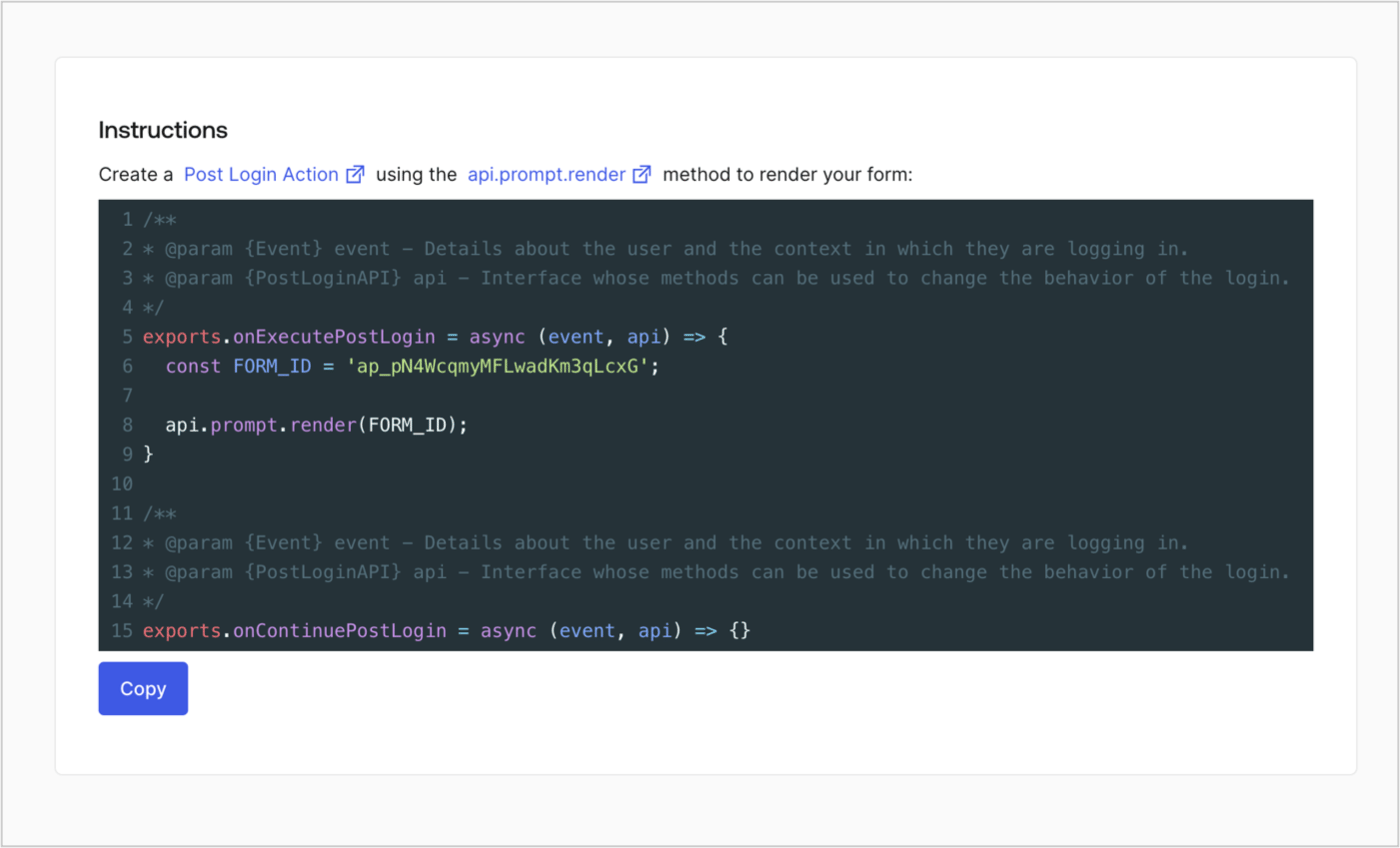
### Retrieve the form render code

Retrieve the form render code to visually render the form with a custom Post Login Action by following these steps:

* From the Form editor, select **`<> Render`**.
* Select **Copy**.
<Frame>
  <img src="https://mintcdn.com/docs-staging-feat-docs-5612-expanded-grant-support-ea/xVUgBmlPWQs-srLo/docs/images/cdy7uua7fh8z/2EIUzc539sq9lwoTKbjoJv/496a864c0fc44a782c9cadca119dbfb0/embed.png?fit=max&auto=format&n=xVUgBmlPWQs-srLo&q=85&s=5037659d08fc41edb76d7cdeb1510c52" alt="Dashboard > Actions > Forms > Form > Embed" data-og-width="1400" width="1400" data-og-height="848" height="848" data-path="docs/images/cdy7uua7fh8z/2EIUzc539sq9lwoTKbjoJv/496a864c0fc44a782c9cadca119dbfb0/embed.png" data-optimize="true" data-opv="3" srcset="https://mintcdn.com/docs-staging-feat-docs-5612-expanded-grant-support-ea/xVUgBmlPWQs-srLo/docs/images/cdy7uua7fh8z/2EIUzc539sq9lwoTKbjoJv/496a864c0fc44a782c9cadca119dbfb0/embed.png?w=280&fit=max&auto=format&n=xVUgBmlPWQs-srLo&q=85&s=1595f488f456e25fba843b81cdd85454 280w, https://mintcdn.com/docs-staging-feat-docs-5612-expanded-grant-support-ea/xVUgBmlPWQs-srLo/docs/images/cdy7uua7fh8z/2EIUzc539sq9lwoTKbjoJv/496a864c0fc44a782c9cadca119dbfb0/embed.png?w=560&fit=max&auto=format&n=xVUgBmlPWQs-srLo&q=85&s=4c9a1a337f2ca4a53afe529c58d68b51 560w, https://mintcdn.com/docs-staging-feat-docs-5612-expanded-grant-support-ea/xVUgBmlPWQs-srLo/docs/images/cdy7uua7fh8z/2EIUzc539sq9lwoTKbjoJv/496a864c0fc44a782c9cadca119dbfb0/embed.png?w=840&fit=max&auto=format&n=xVUgBmlPWQs-srLo&q=85&s=05141dfee3e62eef65b87185798d84eb 840w, https://mintcdn.com/docs-staging-feat-docs-5612-expanded-grant-support-ea/xVUgBmlPWQs-srLo/docs/images/cdy7uua7fh8z/2EIUzc539sq9lwoTKbjoJv/496a864c0fc44a782c9cadca119dbfb0/embed.png?w=1100&fit=max&auto=format&n=xVUgBmlPWQs-srLo&q=85&s=2a9db7b05c66dd43f58ec4347da2840f 1100w, https://mintcdn.com/docs-staging-feat-docs-5612-expanded-grant-support-ea/xVUgBmlPWQs-srLo/docs/images/cdy7uua7fh8z/2EIUzc539sq9lwoTKbjoJv/496a864c0fc44a782c9cadca119dbfb0/embed.png?w=1650&fit=max&auto=format&n=xVUgBmlPWQs-srLo&q=85&s=25f560e65685545bec4b3c2e9a805fa9 1650w, https://mintcdn.com/docs-staging-feat-docs-5612-expanded-grant-support-ea/xVUgBmlPWQs-srLo/docs/images/cdy7uua7fh8z/2EIUzc539sq9lwoTKbjoJv/496a864c0fc44a782c9cadca119dbfb0/embed.png?w=2500&fit=max&auto=format&n=xVUgBmlPWQs-srLo&q=85&s=fe7b9396c6ff5c00adbe7bf5c8983d7f 2500w" />
</Frame>

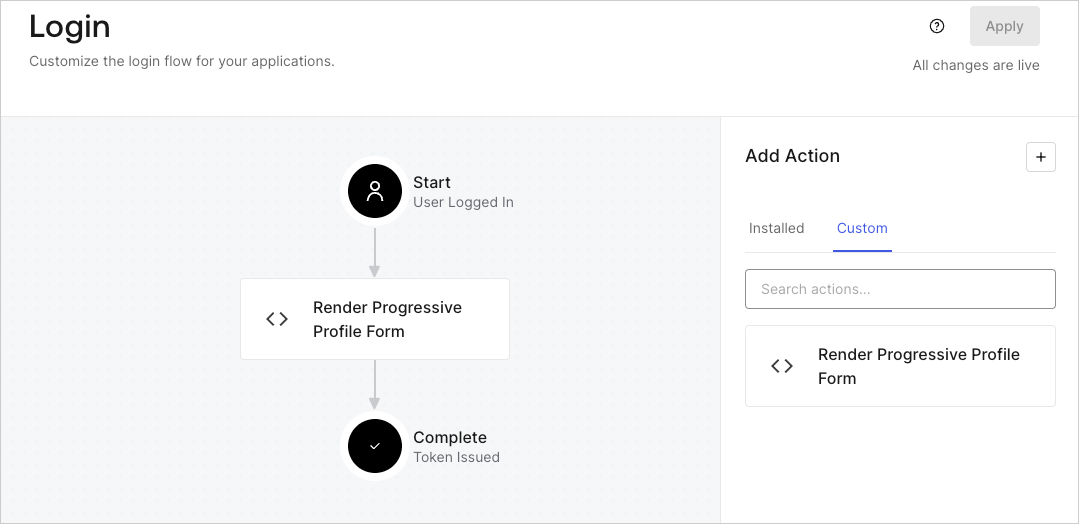
## Create a Post Login Action

Create a post-login Action to render your form by following these steps:

1. Navigate to **Auth0 Dashboard > Actions > Flows > Login.**
2. Select the **+** icon and select **Build from scratch**:

   * **Name**: Enter `Render Progressive Profile Form`.
   * **Trigger**: Select `Login / Post Login`.
   * **Runtime**: Select the recommended version.
3. Select **Create**.

To configure the post-login Action:

1. Delete the existing code from the Code editor.
2. Paste the form embed code into the Code editor.
3. Edit the code to define the conditional logic that will render the form.

   ```javascript lines theme={null}
   /**
   * @param {Event} event - Details about the user and the context in which they are logging in.
   * @param {PostLoginAPI} api - Interface whose methods can be used to change the behavior of the login.
   */
   exports.onExecutePostLogin = async (event, api) => {
     const FORM_ID = 'REPLACE_WITH_YOUR_FORM_ID';

     if (
       event.stats.logins_count > 2 &&
       !event.user.user_metadata.company_name &&
       !event.user.user_metadata.job_title
     ) {
       api.prompt.render(FORM_ID);
     }
   }

   exports.onContinuePostLogin = async (event, api) => { }
   ```

   <Callout icon="file-lines" color="#0EA5E9" iconType="regular">
     The example code above will render the form when a user has a login count > 2 and is missing the user metadata company\_name and job\_title properties.
   </Callout>
4. Select **Deploy.**
5. Drag and Drop the **Render Progressive Profile Form** Action to the **Login** flow.
   <Frame>
     <img src="https://mintcdn.com/docs-staging-feat-docs-5612-expanded-grant-support-ea/NtbCARyqyV6UHeYK/docs/images/cdy7uua7fh8z/1QjjZdpTqTxx012UDN4xk9/99fba5ef4068a5688f1762eea7f42976/renderprogessiveprofile.png?fit=max&auto=format&n=NtbCARyqyV6UHeYK&q=85&s=5bf79dddcedf00f5070bf8f8145d2d62" alt="Dashboard > Forms > Use Cases Progressive Profile Login Action" data-og-width="1079" width="1079" data-og-height="524" height="524" data-path="docs/images/cdy7uua7fh8z/1QjjZdpTqTxx012UDN4xk9/99fba5ef4068a5688f1762eea7f42976/renderprogessiveprofile.png" data-optimize="true" data-opv="3" srcset="https://mintcdn.com/docs-staging-feat-docs-5612-expanded-grant-support-ea/NtbCARyqyV6UHeYK/docs/images/cdy7uua7fh8z/1QjjZdpTqTxx012UDN4xk9/99fba5ef4068a5688f1762eea7f42976/renderprogessiveprofile.png?w=280&fit=max&auto=format&n=NtbCARyqyV6UHeYK&q=85&s=7352e5b264d84a34bb4fe5a3fea6c75f 280w, https://mintcdn.com/docs-staging-feat-docs-5612-expanded-grant-support-ea/NtbCARyqyV6UHeYK/docs/images/cdy7uua7fh8z/1QjjZdpTqTxx012UDN4xk9/99fba5ef4068a5688f1762eea7f42976/renderprogessiveprofile.png?w=560&fit=max&auto=format&n=NtbCARyqyV6UHeYK&q=85&s=194c2931ae9ca5e614b61d4f88809c47 560w, https://mintcdn.com/docs-staging-feat-docs-5612-expanded-grant-support-ea/NtbCARyqyV6UHeYK/docs/images/cdy7uua7fh8z/1QjjZdpTqTxx012UDN4xk9/99fba5ef4068a5688f1762eea7f42976/renderprogessiveprofile.png?w=840&fit=max&auto=format&n=NtbCARyqyV6UHeYK&q=85&s=02f8c14fc59864d957d42db6ef1f7db2 840w, https://mintcdn.com/docs-staging-feat-docs-5612-expanded-grant-support-ea/NtbCARyqyV6UHeYK/docs/images/cdy7uua7fh8z/1QjjZdpTqTxx012UDN4xk9/99fba5ef4068a5688f1762eea7f42976/renderprogessiveprofile.png?w=1100&fit=max&auto=format&n=NtbCARyqyV6UHeYK&q=85&s=1f3bf10ef9744201f2ec879621fc9bdf 1100w, https://mintcdn.com/docs-staging-feat-docs-5612-expanded-grant-support-ea/NtbCARyqyV6UHeYK/docs/images/cdy7uua7fh8z/1QjjZdpTqTxx012UDN4xk9/99fba5ef4068a5688f1762eea7f42976/renderprogessiveprofile.png?w=1650&fit=max&auto=format&n=NtbCARyqyV6UHeYK&q=85&s=1d715d37636e0ac9518b10296c5518c5 1650w, https://mintcdn.com/docs-staging-feat-docs-5612-expanded-grant-support-ea/NtbCARyqyV6UHeYK/docs/images/cdy7uua7fh8z/1QjjZdpTqTxx012UDN4xk9/99fba5ef4068a5688f1762eea7f42976/renderprogessiveprofile.png?w=2500&fit=max&auto=format&n=NtbCARyqyV6UHeYK&q=85&s=562b33e60887b698b3895c023333e32c 2500w" />
   </Frame>
6. Select **Apply**.

### Test implementation

Test the implementation by following these steps:

1. Log in with an existing user whose login count is greater than 2 and their `user_metadata` attributes `company_name` and `job_title` have no values.
2. The post-login action in the Login flow will render the form and prompt for the information.
3. Select **Auth0 Dashboard > User Management > Users,** locate the user and verify that the `user_metadata` attributes `company_name` and `job_title` contain information.
